Evocative API Gateway – Partner Integration Guide
The Evocative API Gateway provides a public API for partner integration with hotel booking services and comprehensive search capabilities.
Base URLs
- Development:
https://sandbox.evocative.ae - Production:
https://api.evocative.ae
Replace <BASE_URL> with the appropriate environment base URL in your integration.
Environment Differences
- The development environment uses production-like data (not mock content)
- Hotel IDs and static data are largely consistent between dev and production environments
- Static content may vary slightly between environments. To fetch the most up-to-date property data, query the production environment with your Production API key
- Rates and availability may differ between environments
- Inventory size: Approximately 700,000 actively selling hotels worldwide
Property data changes over time
Property attributes (name, coordinates, address) can change, and a property may be replaced — which can also change its identifier. Fetch static data delta updates regularly (see the Properties API lastUpdatedFrom filter) to keep your cache in sync.
Authentication and Security
All API endpoints require authentication via API key:
- Header:
X-Api-Key: <partner-api-key> - Each partner receives a unique API key during onboarding
- Invalid or missing keys result in
401 Unauthorized
Rate Limiting
- Enforced per partner API key (shared across all endpoints)
- Development environment: 60 requests/minute
- Production environment: Customized based on your usage requirements (planned with Evocative in advance)
- Exceeding limit returns
429 Too Many Requests - Multiple concurrent requests are supported within your rate limit
Timeouts & Retries
- Timeout duration: up to 60 seconds per request
- Persistent failures: A timeout or upstream failure returns
502 Bad Gateway - Recovering after a
502: The search continues to run server-side after a failed response, and its result is retained for 5 minutes. To recover, simply re-issue the sameGET /api/v2/search(or packages request) with identical parameters — you will receive the current partial or complete results, and no duplicate search is started. Continue pollingisDoneto completion as usual.
Correlation IDs
- Request: Optionally include
X-Correlation-Idheader (UUID format)- If omitted, the gateway generates one automatically
- Response: Returns the same
X-Correlation-Idheader - Use for request tracking and troubleshooting
Common Headers
Request Headers
X-Api-Key: <partner-api-key>         (required)
X-Correlation-Id: <uuid>              (optional)
Content-Type: application/json        (for POST requests)
Response Headers
Error Handling
Gateway-Generated Errors
- 401 Unauthorized: Missing or invalid API key
- 429 Too Many Requests: Rate limit exceeded
- 502 Bad Gateway: Upstream communication failed after retries
Upstream Errors
Other 4xx/5xx status codes are relayed from upstream services.
Success Response
Error Response
Booking Flow
The recommended integration flow follows three main steps: Search → Quote → Book.
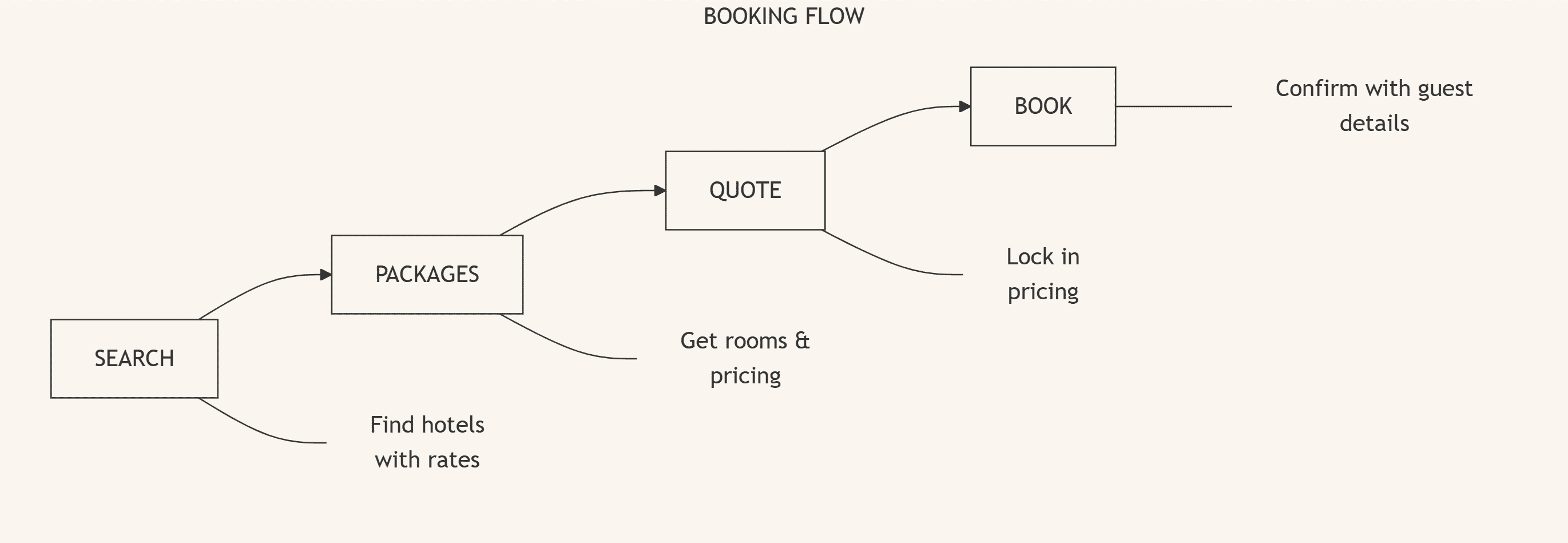
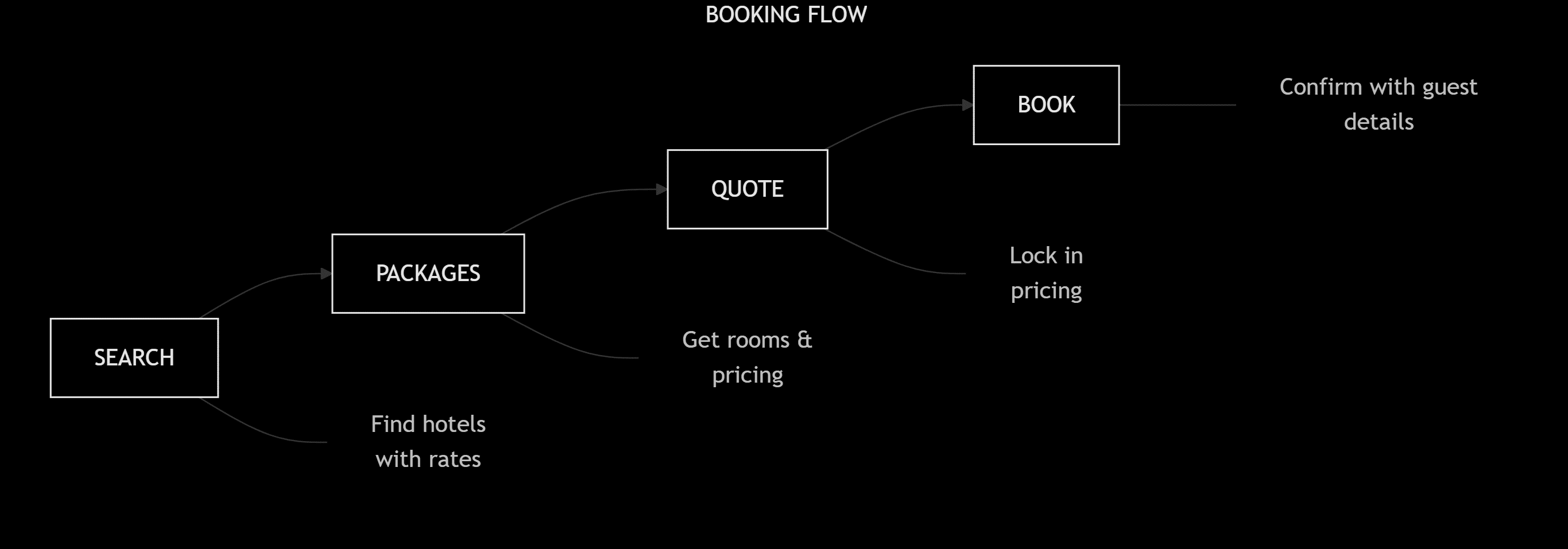
Step 1: Search Hotels
Search for available hotels using GET /api/v2/search (docs) with destination, dates, and guest information. This endpoint returns properties with pricing summaries.
Key points:
- Polling is required until
isDone = true - Returns minimal property info with starting prices
- Supports filtering by location, price, stars, amenities, and property types
Step 2: Get Packages
Once a user selects a property, retrieve available room packages using GET /api/v2/properties/{id}/packages (docs). This returns detailed pricing, board types, taxes, and cancellation policies.
Key points:
- Polling is required until
isDone = true - Returns full package details including cancellation terms
- Use
GET /api/v2/properties/packagesfor batch requests
Step 3: Create Quote
Create a quote for the selected package using POST /api/v2/quote (docs). This generates a packageBookingId that locks in the pricing.
Key points:
- Takes a
packageIdfrom the packages response - Returns confirmed pricing and package details
- The
packageBookingIdis required for the final booking
Step 4: Complete Booking
Finalize the reservation using POST /api/v2/book (docs) with customer and guest details.
Key points:
- Requires
packageBookingIdfrom the quote step - Include customer contact information and guest names for each room
- Returns booking confirmation with
supplierReferenceNumberfor check-in
API Reference
Core Booking APIs
| API | Description |
|---|---|
| Search API | Search hotels, get room packages and pricing |
| Quote & Book API | Create quotes and complete bookings |
Static Data APIs (Optional)
These endpoints provide reference data and detailed property information. Use them to enrich your UI or cache property details.
| API | Description |
|---|---|
| Properties API | Get static property data (addresses, amenities, images, policies) |
Additional APIs
| API | Description |
|---|---|
| Bookings API | Manage and cancel existing bookings |
| Liabilities API | View credit utilization and liability records (Credit Line partners) |
| Rooms Mapping API | Map room inventory between suppliers (Mapping-enabled partners) |
| Identifier Reference | What each id / reference field means and how it maps to the Ops portal |
Partner Pricing
All prices returned in API responses represent the final net amount payable by the partner, including:
- Evocative's commission/markup
- All applicable taxes and fees
- No additional fees are applied during invoicing
The price you see in the API is the exact amount you will be charged. The final, partner-payable amount is confirmed at the Quote step (totalPrice); no further calculation of commissions, promos, or markup is required on your side. See Quote & Book API for details.
Each entry in taxesAndFees is returned as a total value per booking: the amount is already summed across all rooms and nights, so do not multiply it by rooms, nights, or guests. This applies both to amounts included in the price and to excluded fees payable at the property (isIncludedInPrice: false).
Payment Model
- The API supports the Credit Line payment model.
- Bookings draw against your credit line; utilization and liability records are available through the Liabilities API.
Currency
- All monetary amounts use ISO 4217 currency codes (e.g.,
USD). - Prices in search and booking responses are returned in USD, and search price filters (
minPrice/maxPrice) are expressed in USD. - A desired/target currency cannot be requested — responses are not converted to a partner-specified currency.
- Local taxes and fees may be returned in a different currency than the room price. Always read the
currencyfield on each amount (including each entry intaxesAndFees) rather than assuming a single currency for the whole response. - Nested amounts that omit
currencyinherit the order-levelcurrency. For example, entries incancellationPoliciescarry nocurrencyof their own — theirfeeis expressed in the top-level ordercurrency.
Onboarding Checklist
Information to Receive from Evocative
- Partner Code
- API Key
- Allowed CORS origins
- Rate limit configuration
- Base URLs for each environment
Configure Your Client
- Include
X-Api-Keyheader on every request - Optionally set
X-Correlation-Idfor request tracking - Handle rate limiting with exponential backoff
- Implement timeout handling (allow up to 60s per request; see Timeouts & Retries)
- Implement polling for search and packages endpoints (2s intervals)
Versioning & Stability
- Most endpoints are considered stable with no breaking changes planned
- Deprecation notice: Breaking changes will be communicated at least 1 month in advance
- Gateway routes are stable business endpoints
- Upstream paths and versions may change without breaking gateway routes
- API versioning follows semantic versioning principles
Support
When contacting support, include:
X-Correlation-Idfrom the response- Timestamp (UTC)
- Full request path and HTTP method
- Partner Code and environment (dev/production)
- Sample request/response (redact sensitive data)
- Order/booking ID (if applicable)
Appendix: Query String Arrays
When passing array parameters, you can repeat the parameter name or use the , delimiter: